

After spending hundreds of hours working in Google Ads accounts for both B2C and B2B clients, one observation keeps coming up: many advertisers configure their audiences without fully understanding the difference between the two available audience settings: Targeting and Observation.
It may seem like a minor detail. It is not. This choice directly determines who can see your ads and the quality of the traffic your campaigns generate. It also allows you to analyze which audiences are most relevant to your active campaigns, helping you target them more effectively over time. Ultimately, this can contribute to stronger KPIs, including a lower cost per conversion.
In other words, it is one of the most underused levers in Google Ads, even though it is also one of the easiest to correct once you understand how it works.
Targeting and Observation: Two Opposing Approaches
The confusion often comes from the fact that both settings use the exact same audiences in the Google Ads interface. The difference is not in what you select, but in how those audiences affect delivery.
Targeting restricts delivery. Your ads are shown only to people who belong to the selected audience segments. The result is a budget concentrated on more qualified profiles, but with a necessarily smaller potential reach.
Observation, on the other hand, does not restrict delivery. Everyone already targeted by your campaign through keywords, placements or other criteria can continue to see your ads. The audience is used only as an additional layer of analysis. It allows you to measure metrics such as cost per click, conversion rate and CPA for each audience segment. Based on the data, you can then adjust bids or even exclude a segment entirely.
In summary, targeting restricts delivery to maximize immediate relevance, while Observation provides insights that help bidding strategies optimize more effectively.
When Should You Choose One Over the Other?
Targeting becomes relevant when you already understand a segment well and know that it converts effectively. It is also useful when keywords alone are not enough to determine whether a user is qualified. For example, imagine that you sell alarm systems for businesses. The keyword “alarm system” could be searched by both consumers and companies. By targeting that keyword while also applying a B2B audience in Targeting mode, you can ensure that your ads reach only the users who are genuinely relevant to your business.
This is typically useful in the following situations:
- Remarketing, where intent has already been established
- Niche B2B markets, where search volume is naturally limited and every impression matters
- Display and YouTube campaigns, where overly broad delivery can quickly dilute budget efficiency
Observation is the preferred option when your understanding of the audience is still incomplete or when you are testing a new market. Instead of restricting delivery without enough evidence, you allow the campaign to run normally while collecting performance data for each segment. That data can then support future targeting decisions.
One best practice I systematically apply with clients is to start with Observation. In most cases, this setting already allows us to bid more or less aggressively on certain audiences without necessarily restricting targeting later on. We let the data speak. Switching to Targeting remains relatively rare and should happen only when we clearly understand what we are excluding from the campaign’s reach.
The Audience Types Available to You and Their Purpose
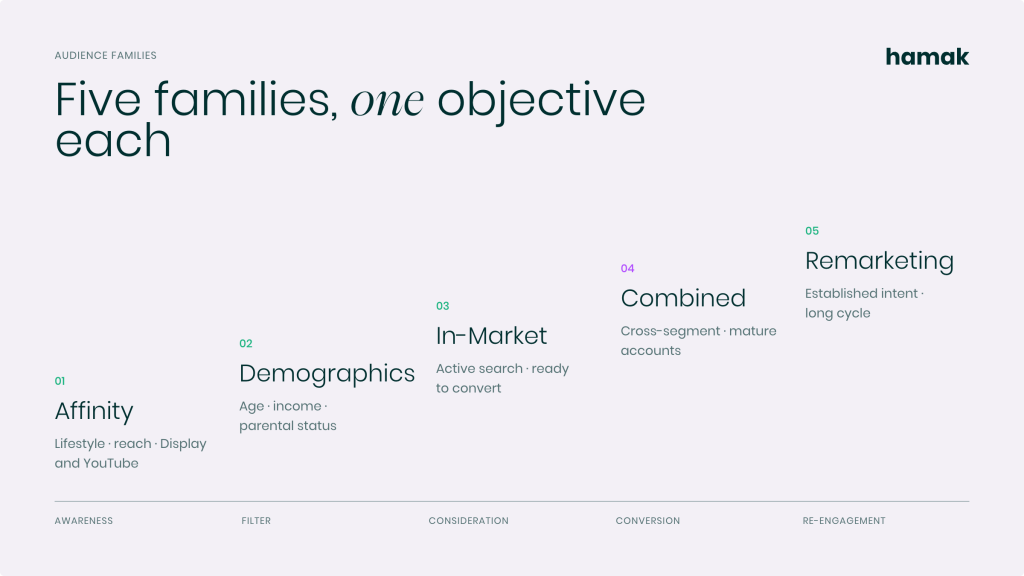
Google Ads offers several audience categories. Each one supports a specific objective and corresponds to a different level of maturity in the prospect journey.
Remarketing Audiences
Remarketing audiences are used to re-engage users who have already interacted with your brand, in both B2C and B2B contexts. In e-commerce, the classic example is an abandoned cart. In B2B, remarketing helps your brand remain visible to high-intent leads throughout the decision-making process, which is often longer and involves multiple touchpoints.
In-Market Audiences
In-Market audiences include users who are actively researching a product or service. These are prospects who may be close to converting. For example, a B2C car insurance provider could target the “Auto Insurance” In-Market audience to reach consumers who are currently comparing providers and coverage options. This type of audience often performs particularly well in B2C, where the buying journey tends to be shorter and largely digital.
Affinity Audiences
Affinity audiences are based on users’ long-term interests, habits and lifestyles. They are particularly useful for expanding reach across Display and YouTube campaigns, especially when the primary objective is brand awareness rather than immediate conversion.
Combined Audiences
Combined audiences allow you to intersect multiple segments and create a more customized profile. For example, you could target users who are In-Market for B2B software and who have also previously visited your website. This is particularly useful for mature accounts where the organization already has a strong understanding of customer behaviour and wants to refine reach as precisely as possible.
Demographic Audiences
Demographic audiences segment users according to criteria such as age, gender, parental status or household income. They can be useful when a company’s offer clearly applies to a specific group or when certain demographic segments consistently generate a significantly higher conversion rate than others.
A Proven B2B Strategy: Separating Precision From Exploration
Here is an account structure I often recommend in a B2B context and that can produce concrete results. The idea is to filter traffic effectively without preventing Google from identifying new opportunities. To achieve this, we separate two distinct approaches within the account structure.
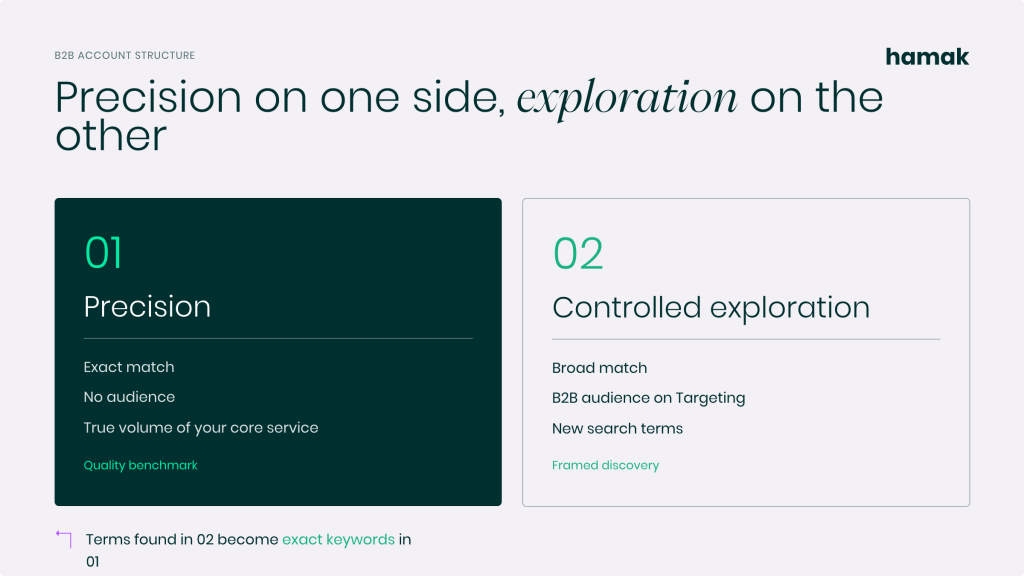
Campaign 1: Precision
The first campaign uses only exact-match keywords, such as “alarm system for business,” without applying an audience in Targeting mode. This campaign captures the clearest possible search intent and provides a clean view of the actual demand related to your core service. It becomes your quality benchmark.
Campaign 2: Controlled Exploration
The second campaign uses broad-match keywords, such as “alarm system,” but restricts delivery using a B2B audience in Targeting mode. The objective is not to broaden delivery simply for the sake of increasing reach. The goal is to allow Google to explore variations of search terms you may not have considered, while keeping delivery anchored to a relevant user profile. New search terms identified through this campaign can then be added to the first campaign as exact-match keywords.
This combination—exact match on one side and controlled broad match on the other—allows you to expand your market without sacrificing traffic quality. It can also uncover valuable intent signals that can later strengthen and refine your broader audience strategy.
Key Takeaways
Choosing between Targeting and Observation is not simply a campaign configuration detail. It is a strategic decision that should reflect both your level of audience knowledge and the actual objective of each campaign. When properly understood and applied, this distinction becomes one of the most effective ways to improve campaign relevance while maintaining control over customer acquisition costs. Want to audit your Google Ads audiences and find out where you’re missing out? Contact our team! We’d be happy to talk it through with you.